Content



Repost helps you quickly share someone else's content, support an author, show a customer review, or distribute useful Reels. Instagram has several distribution methods: in stories, Direct, the repost feed, and through the standard Share button. In 2025, Meta separately introduced reposts for public Reels and posts, so there are more options, but privacy restrictions remain important. Instagram already has about 3 billion monthly users, so sharing content properly matters for personal profiles and brands alike.
How to repost on Instagram is not a request for one button, but for several different actions in the app. A user can share a story post, send Reels to Direct, or use the repost feature for public content. The choice depends on the type of material, the author's settings, and where exactly the content should be shown.
You can add a public post to stories via the share button below the post. Instagram shows such material as a clickable sticker leading to the original post. This is a convenient way to share content without manually copying a photo or text.
Reels can be distributed to stories, sent to Direct, or repost if the feature is available for specific content. This format is especially useful for brands, as short videos often get more engagement. If you need to understand how to distribute videos on Instagram, you should first check whether the author's profile is open.
Direct is suitable when you want to show content to a specific person or small group. To do this, just press the Share button and select the chat you want. This method does not create a public repost on Instagram, but it works well for quickly sharing ideas.
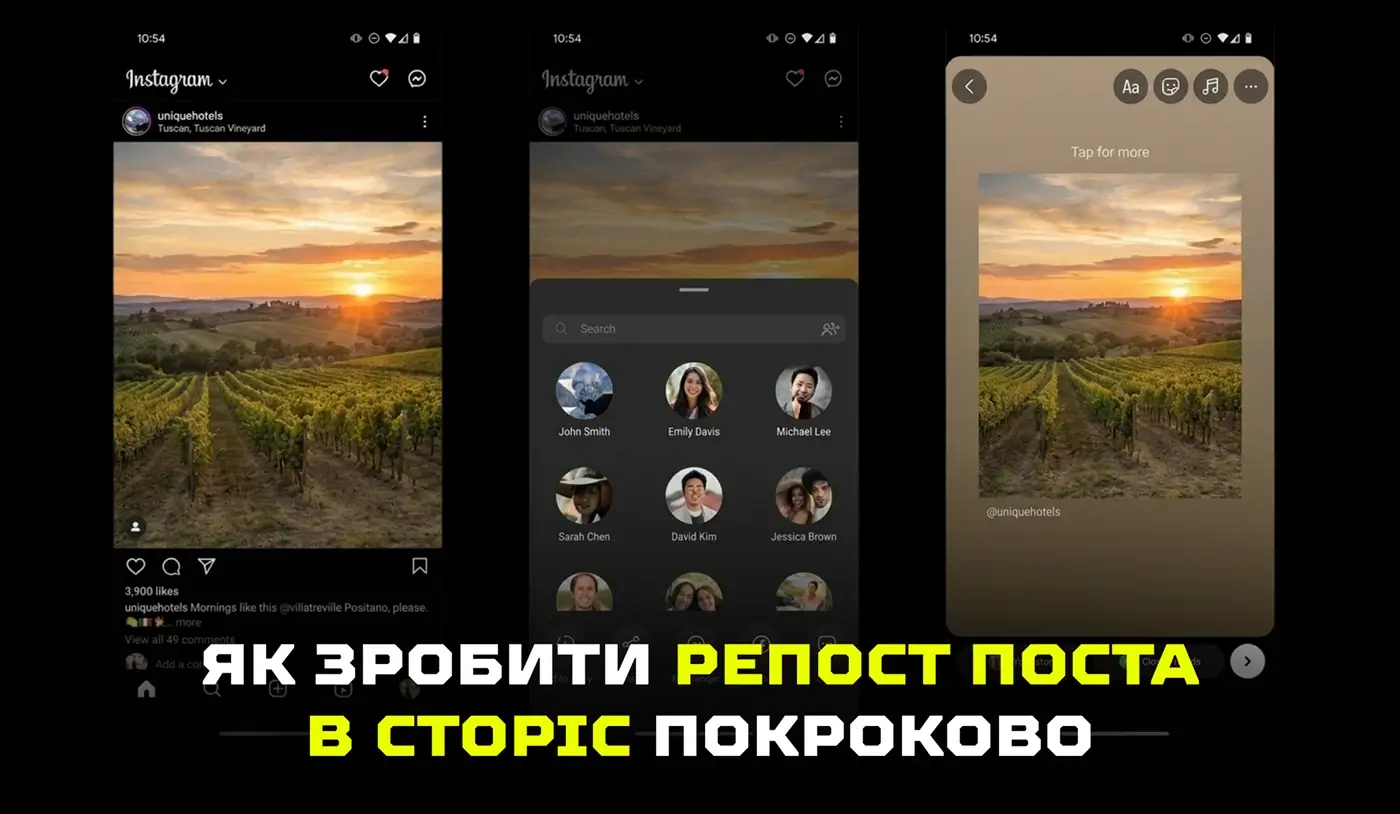
How to repost stories on Instagram now depends not only on the mention, but also on the author's settings. The classic way works when you're tagged in stories — then Instagram gives you a button to add to your story. At the same time, Instagram is already introducing the ability to share stories from public accounts even without a tag, unless the author has disabled such distribution in the privacy settings.
To share a post in stories, open the post, click the share button, and choose to add to stories. Then you can change the sticker size, add text, emoji, or your own comment. If a user is looking for how to share a post on Instagram, this method will be the easiest.
The button may not appear due to a private profile, disabled story distribution, lack of access to a new feature, or a temporary application crash. You should also update Instagram and check if the feature is available in your account, as new features are sometimes introduced gradually. If you need to understand how to repost stories on Instagram, you should check not only the mention, but also the privacy of the author's profile.
A repost in stories looks better when it is not just inserted, but supplemented with a short context. You can add your own opinion, reaction, arrow, background, or a call to go back to the original. Such details make the distribution alive, not random.
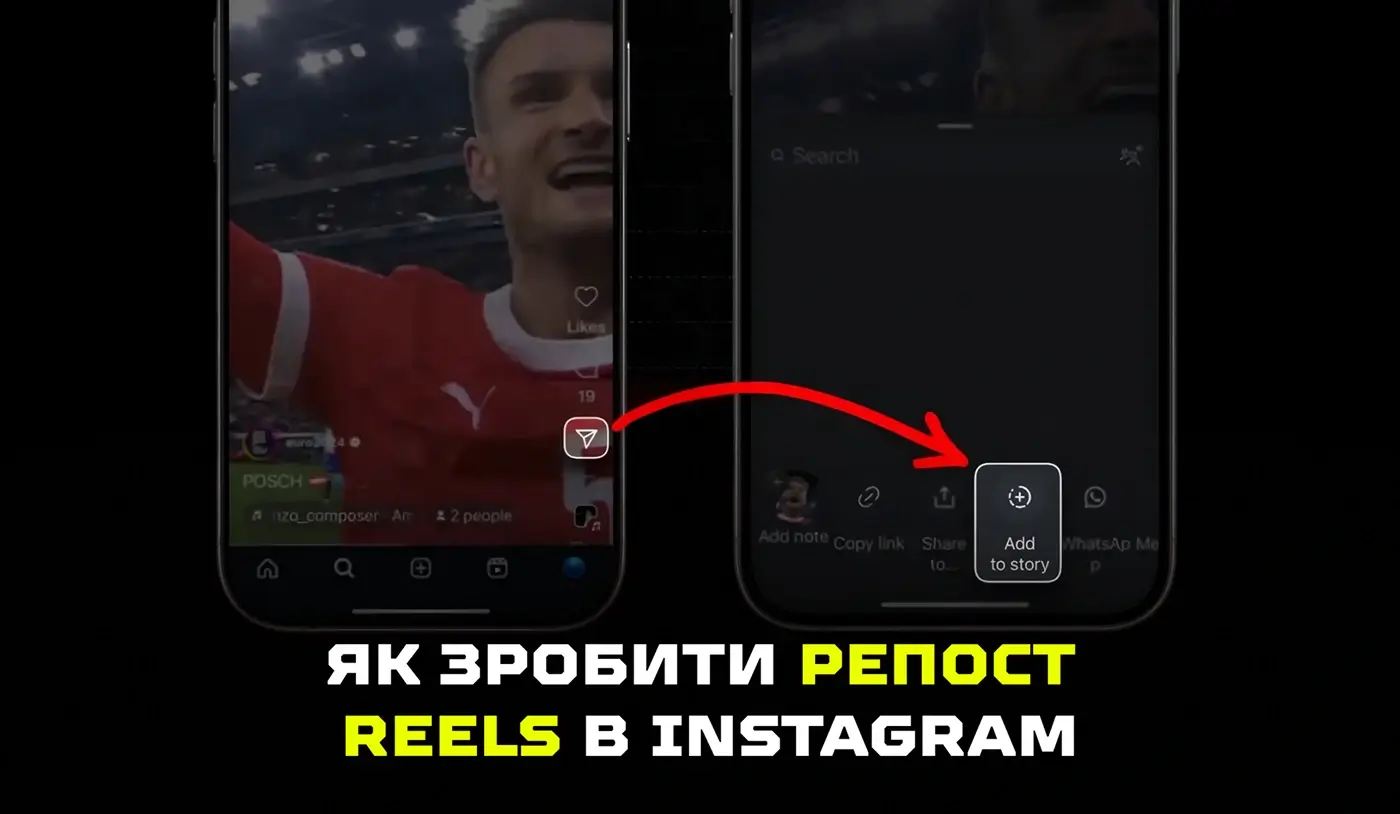
How to repost Reels depends on where exactly you want to distribute it. One option is to add the video to stories, the other is to send it to Direct. After the updates, Instagram is also developing a separate repost feature for public Reels and posts.
Open Reels, click Share and choose to add to stories. The video will appear as an interactive element through which the viewer can navigate to the original. This is useful when you need to quickly show a trend, review or a useful video.
Direct is suitable for distributing Reels privately without posting to your profile. Just click Share, select a contact and add a short message. This method is useful in teamwork, when an SMM specialist sends content examples to a client or colleagues.
Most often, the problem is related to account privacy, author settings, or regional implementation of the feature. Also, some features may look different after the app is updated. Before reposting, it is better to check whether distribution is available without violating the author's rights.
How to repost on Instagram on Android and iPhone is almost the same, although the interface may be slightly different. The basic logic is the same everywhere: open content, click Share and select the desired distribution format. The difference is more often about the type of buttons than the function itself.
On Android and iPhone, Instagram is updated gradually, so features may not appear at the same time. One user already has the button, and another user will have it available after the update. This is a normal situation for large platforms that are testing changes in stages.
The Share icon usually looks like a paper plane or a distribution button. In some versions of the app, additional actions are opened through the menu. If the buttons look different, look for a similar action in the menu: share, send, or add to stories.
Before distributing, you should do a brief check:
After such a check, it's easier to understand whether the problem is in the settings, in the application, or in the content itself.
Even when a user already knows how to repost stories on Instagram, the right button may not always appear. Instagram takes into account the author's privacy, distribution permission, mentions, availability of new features, and the technical condition of the app. Therefore, the absence of a button is often due not to an error, but to account or platform restrictions.
Stories from private profiles remain protected and are not freely distributed outside the permitted audience. On public accounts, the author can allow or disable the redistribution of his stories. Therefore, before reposting, it is important to consider not only the button in the interface, but also the author's right to control the distribution of content.
The account owner can disable the ability to share stories in the settings. In this case, other users will be able to view the content, but not add it to their stories via the standard button. If a brand wants to use a customer, partner, or influencer's stories, it's best to get permission and keep the author's mention correctly.
Sometimes a feature disappears due to a cache, an unstable update, or an old version of the app. Try updating Instagram, restarting your phone, and then trying again later. If the question of how to repost on Instagram often arises, you should keep a simple checklist of actions for the team.
How to repost an Instagram post to your own feed is a more difficult question than sharing it in stories. Instagram allows you to repost public Reels and posts through a special feature, but the classic copying of someone else's post to your profile without permission remains risky. For brands, not only technology is important here, but also the ethics of working with content.
Instagram's official capabilities include distributing accessible public content in stories, Direct and repost. This is safer than copying someone else's photo or video manually. This keeps in touch with the original author, and the audience sees the source.
Third-party apps are sometimes used when you need to save or republish someone else's material. For a brand, this should be done carefully, with the author's permission and without concealing the origin of the content. A safer option is to agree on the use of the material and tag the author in the description.
Before re-publishing, you should go through a brief check:
This approach protects the brand from reputational risks and makes working with user-generated content more honest.
Reposting on Instagram is not just a quick action in the app, but part of communication with audiences, authors, and partners. If you know how to repost on Instagram, you can share stories, Reels, and posts without losing correctness and respect for the source. In order for social networks to work not with random publications, but with an understandable system with content, analytics and promotion, the Locomotive Digital team is part of the service SMM will help build an effective brand presence on Instagram and make communication consistent.
AI website audit
Enter your website address and get results instantly.

Request a free audit — our expert will prepare a personalized action plan.
Your data is securely protected