

Content


Every extra step between an ad and the target content increases the risk of losing a user. This is especially noticeable in mobile apps, where people expect to open a specific product, promotion, or section immediately. Deep links shorten this journey and help maintain the context of the interaction. They are useful in advertising, email newsletters, push notifications, and other acquisition channels.
A deep link is a link that leads not just to an app, but to a specific screen or piece of content within it. For example, a person clicks on an ad for sneakers and immediately sees the product page for that model instead of the main catalog screen. This scenario shortens the path to the target action.
A standard deep link may contain a special app URI scheme or a standard web domain associated with it. After a click, the operating system determines which program should handle the link. If everything is configured correctly, the user opens the relevant section immediately.
The main task of deeplinks is to remove unnecessary intermediate screens between an advertising channel and the target content. This is especially important when an ad or message is dedicated to a specific product, plan, promo code, or event. The shorter the route, the easier it is for a person to continue their intended action.
The mechanics depend on the operating system, the type of link, and whether the app is installed on the device. The system checks the URL, matches it with the app's settings, and determines which screen to open. Some solutions also store information about the advertising campaign or traffic source.
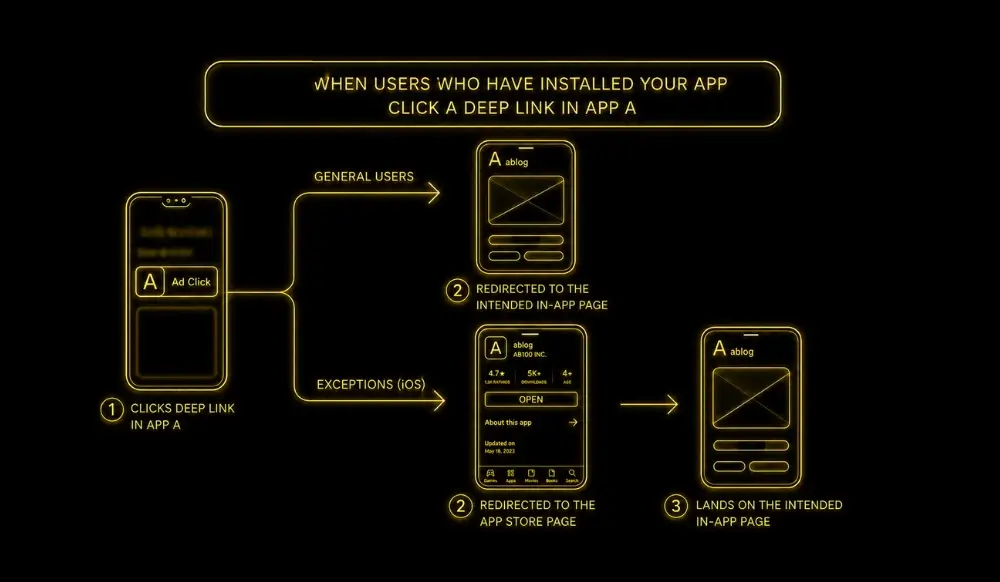
When the app is already on the smartphone, a properly configured deep link opens the specific screen. This could be a product page, profile, shopping cart, booking page, or a personalized offer. The user does not have to search again for what they already selected in the ad or message.
Behavior depends on the link implementation. A deferred deeplink can first direct a person to the app store, and after installation, open the target content. This way, a marketing campaign preserves the original context even after an additional step.
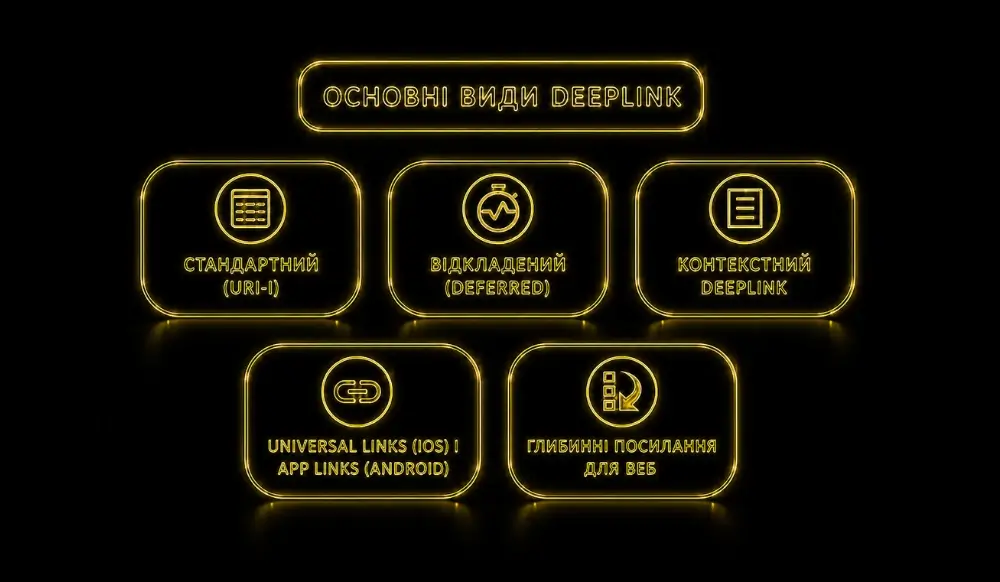
Different types of deep links solve specific tasks. The choice depends on whether the app is installed and what information needs to be passed after the click. Three approaches are used most often.
A traditional deeplink works when the app is already installed and capable of handling the corresponding URI scheme or URL. It opens the specified screen immediately without an additional route. If the app is not present, this format may not produce the expected result without separate fallback logic.
Deferred deep linking accounts for situations where the app is not yet on the device. The person is first taken to the App Store or Google Play, installs the app, and sees the target content upon the first launch. This format is especially useful in campaigns for acquiring new audiences.
Contextual deeplinks pass additional information about the traffic source, campaign, or other parameters. This helps personalize the next screen and more accurately analyze audience behavior. For example, different ads can lead to the same category while passing distinct advertising tags.
The differences between the three formats are best compared in a table:
The table shows that the format should be chosen based on the interaction scenario, rather than just the implementation method.
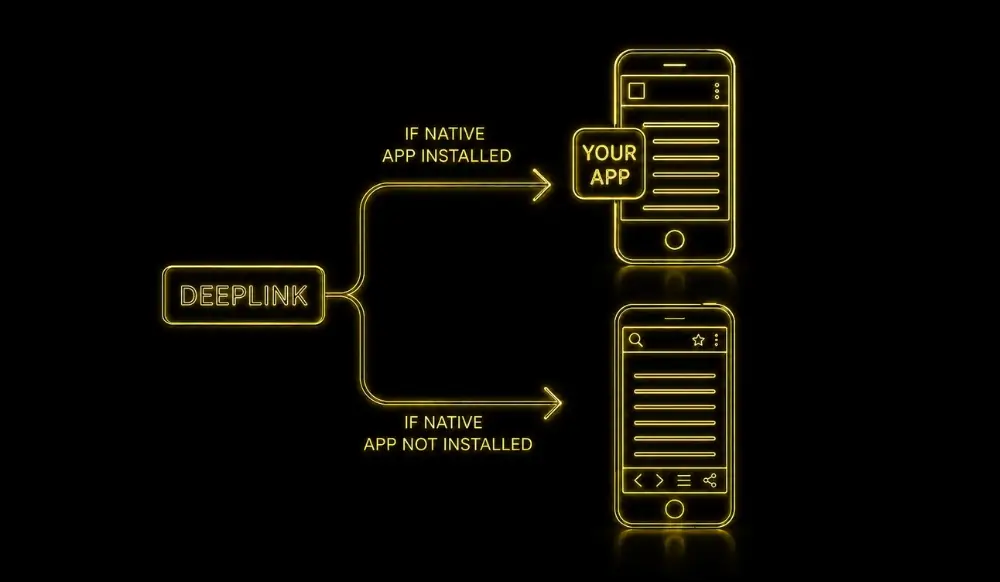
A standard URL primarily opens a webpage in a browser, whereas a deep link can direct a user into a mobile app. The difference is especially noticeable when the user is already logged in and can immediately continue their activity. This reduces the number of intermediate screens between channels.
A regular link often leads to a home page or landing page, after which the desired section must be found manually. A deep link immediately opens a specific screen with relevant information. This makes the path from an ad to a purchase, booking, or other action much shorter.
For a web link, a correct URL and an accessible page are sufficient. Mobile deep links require additional configuration within the app itself and integration with a domain or URI scheme. Before launching, it is important to test behavior across different devices and in multiple scenarios.
Deep links are useful wherever a business aims to shorten the path from a message to a specific action. They connect an external channel to a target app screen and help maintain the context of the interaction. This technology is most commonly used in mobile marketing, advertising, and communication with an existing audience.
A deeplink allows you to open a product, profile, chat, cart, or other section without manual navigation. This is convenient for repeat purchases, loyalty programs, and personalized offers. In this scenario, the app continues the previous interaction instead of returning the user to the home screen.
Main use cases in apps:
These scenarios are particularly useful for services that involve frequent repeat actions.
In advertising, deep links help align creative content with the final destination. It makes sense to direct an ad for a specific product model straight to that item rather than to the general catalog. This shortens the post-click journey and simplifies the analysis of subsequent user actions.
In an email or push notification, a deep link can open a promotion, bonus, order, or personalized recommendation directly. Users don't have to launch the app and search for the right section again. This is exactly why deep links work so well when communicating with an audience already familiar with your product.
The technical approach depends on the platform, app architecture, and chosen scenario. iOS uses Universal Links, while Android uses App Links and other deep linking mechanisms. Before launching, you should define your destination screens, behavior for when the app is not installed, and analytics parameters.
First, the team determines which URLs should correspond to specific app screens. Then, they configure link handling, web domain association, and routing rules. If a deferred scenario is used, the path through the App Store or Google Play must be planned separately.
Before launching, you should verify:
Testing under different conditions helps identify issues before a campaign goes live.
It is important to track not just clicks, but also actions taken after the app opens. This could include product views, items added to the cart, registrations, bookings, or purchases. Analysis will show whether deep links are truly shortening the path to the target action and supporting campaign results.
Deep links work best when they logically follow through on the promise made in your ad. If your creative shows a specific product or offer, the user should see exactly that after clicking, rather than a general catalog. Consistency between the ad and the subsequent screen reduces unnecessary steps.
Before launching a campaign, it is worth determining which screen corresponds to the audience's intent after each ad. The Locomotive Digital team can take this journey into account when setting up targeting, so that the advertising message and the subsequent action form a unified scenario. After launch, the results should be evaluated based on in-app events, conversions, and audience behavior.
AI website audit
Enter your website address and get results instantly.

Request a free audit — our expert will prepare a personalized action plan.
Your data is securely protected